

GenAI for Effective Presentations
You don’t need design experience — AI handles the heavy lifting while you focus on your message.
Secure your place in the next available run and get hands-on practice with ChatGPT, Gemini, and Gamma.
Need help choosing funding? Call +65 8221 5143
Course Overview
"GenAI for Effective Presentations" empowers learners to leverage generative AI for creating impactful presentations. This course covers AI-driven content generation, automated slide design, and the creation of immersive experiences. Trainees will gain skills in using GenAI tools to automate tasks, personalize narratives, and enhance audience engagement. The syllabus includes modules on AI-powered brainstorming, data visualization, immersive storytelling and interactive element creation. Learn to transform static presentations into dynamic, engaging experiences using cutting-edge GenAI tools. Enhance your presentation skills and future-proof your communication strategy.
Platforms & Tools Introduced



Learning Outcomes
By the end of this course, learners are able to:
- Interpret the overall objectives of a presentation by incorporating relevant principles of content design for presentations.
- Review the target audience for a presentation and determine the best ways to tailor the information disclosure to that audience.
- Develop AI-generated information with structured topics for different communication purposes.
- Construct AI-generated information through text-to-multimedia tools for audience engagement.
- Apply communication techniques to refine AI-generated presentation script for optimal engagement.
- Integrate AI-generated content into desired presentation and collaterals.
- Evaluate presentations based on iterative feedback and a deep understanding of audience needs.
Minimum Entry Requirements
Able to speak, listen, read and write English at a proficiency level not lower than the Employability Skills WSQ Level 4 Workplace Literacy (WPL).
Other Details
Training Type
Training and Assessment
Medium of Instruction
English
Where can I find and download my digital certificates via OpenCerts?
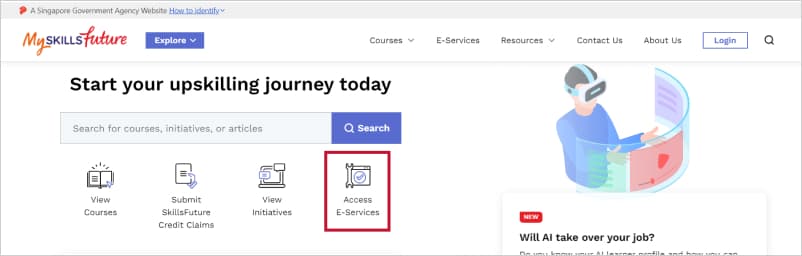
Visit www.myskillsfuture.gov.sg and click on "Access E-Services".
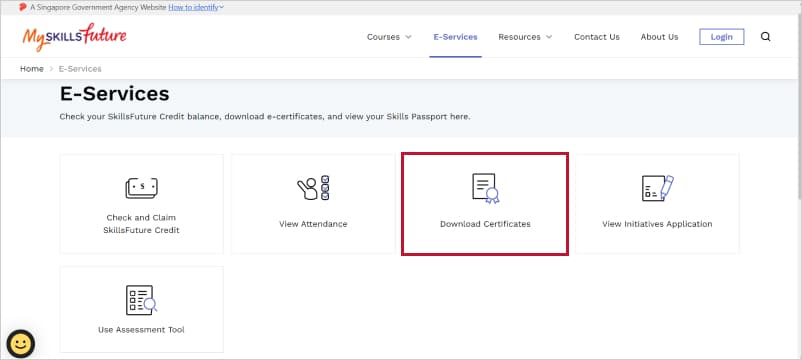
Select "Download Certificates" and you will be prompted to log in.
Log in via Singpass and you will be redirected to the Skills Passport page, where you can view your list of learning achievements.
Click on the specific record and click on the OpenCerts icon to download your respective digital certificates. A new browser tab for www.opencerts.io will open.
Click on the "Print" button.

Course Fee
TGS-2025055863 GenAI for Effective Presentations Funding Validity Period: 17–Jun–2025 to 16–Jun–2027 | Full Course Fee For Foreigners and those not eligible for subsidies | SG Citizen (21–39 yrs) or SG PR ≥ 21 yrs old SkillsFuture Funding (Baseline) 50% | SG Citizen (Above 40 yrs old) SkillsFuture Mid-Career Enhanced Subsidy 70% | SME Sponsored SkillsFuture Enhanced Training Support for SMEs 70% |
|---|---|---|---|---|
| Course Fees | S$1000.00 | S$1000.00 | S$1000.00 | S$1000.00 |
| With GST (9%) | S$1090.00 | S$1090.00 | S$1090.00 | S$1090.00 |
| SkillsFuture Funding | –S$0.00 | –S$500.00 | –S$700.00 | –S$700.00 |
| Total Nett Fee | S$1090.00 | S$590.00 | S$390.00 | S$390.00 |
All Singaporeans aged 25 and above can use their S$500 SkillsFuture Credit from the government to pay for a wide range of approved skills-related courses. Visit MySkillsFuture for details.
Refund Policy
Edusphere College is committed to transparent fee policies. The following refund guidelines apply to all WSQ courses.
Any appeals will be reviewed on a case-by-case basis and are subject to management approval.
| Notice Period Before Course Start | Refund Eligibility |
|---|---|
| More than 14 days | 100% of course fees refunded |
| 7 to 14 days | 50% of course fees refunded |
| Less than 7 days | No refund |
Get in Touch
Let's start the registration process!
Fill in the form below and we'll get back to you as soon as possible